How to create a vSession BdREN Zoom
What is BdREN Online Education Service?
Here are the details for that. BdREN provides an easy-to-use Zoom video conferencing platform that provides high definition, interactive collaboration tools, and a video conferencing system to use for communication and collaboration. With Zoom you can instantly start a virtual meeting with colleagues and students using MacOS, Windows, & Linux platforms, and also using free apps from Apple and Android devices.
Although it is possible to sign up directly for a free Basic license at ZOOM, this has limitations on meeting duration and participant numbers. BdREN has a corporate zoom license
which surmounts all those limitations. This license is available only for BdREN’s member institutions.

How to create a vSession BdREN Zoom Account for 180 minutes free meeting.
vSession BdREN Account:
BdREN has introduced vSession Zoom accounts which is a centrally managed and easy-to-use class/meeting scheduler. In order to use vSession, every teacher must register themselves first on the vSession portal.
We appreciate your intrigue in conducting online classes in the midst of such a global disaster and thus helping the student community to continue their academic activities with minimum interruption. We would humbly request you to follow the following guidelines set by UGC.
-
Please send the email to helpdesk@bdren.net.bd keeping your honorable ViceChancellor in CC.
-
Please send the email from your official email address or share the link of your profile in the university’s website.
-
Please share your detail contact information (Full Name, Designation, Department and Phone number).
-
Please help us in authenticating you at the quickest possible time to expedite the account creation process by following the above-mentioned guideline.
-
The account will be provided and confirmed within 24 hours.
Features:
- Maximum 300 participants
- Screen Sharing
- Annotation
- White Boards
- Breakout rooms
- Chat
- Local Recording
- Telephone Audio Connections
- Polling (for On-Prem Zoom account)
- Cloud Recording (will be available soon)
Getting Started with BdREN vSession Zoom Account
- Getting Started with vSession Zoom Account
- First sign in to your vSession Zoom account by going to vsession.bdren.net.bd and selecting the Sign In button. If you are not registered, please click the register button to get registered yourself.
How can I schedule a class/meeting using vSession?
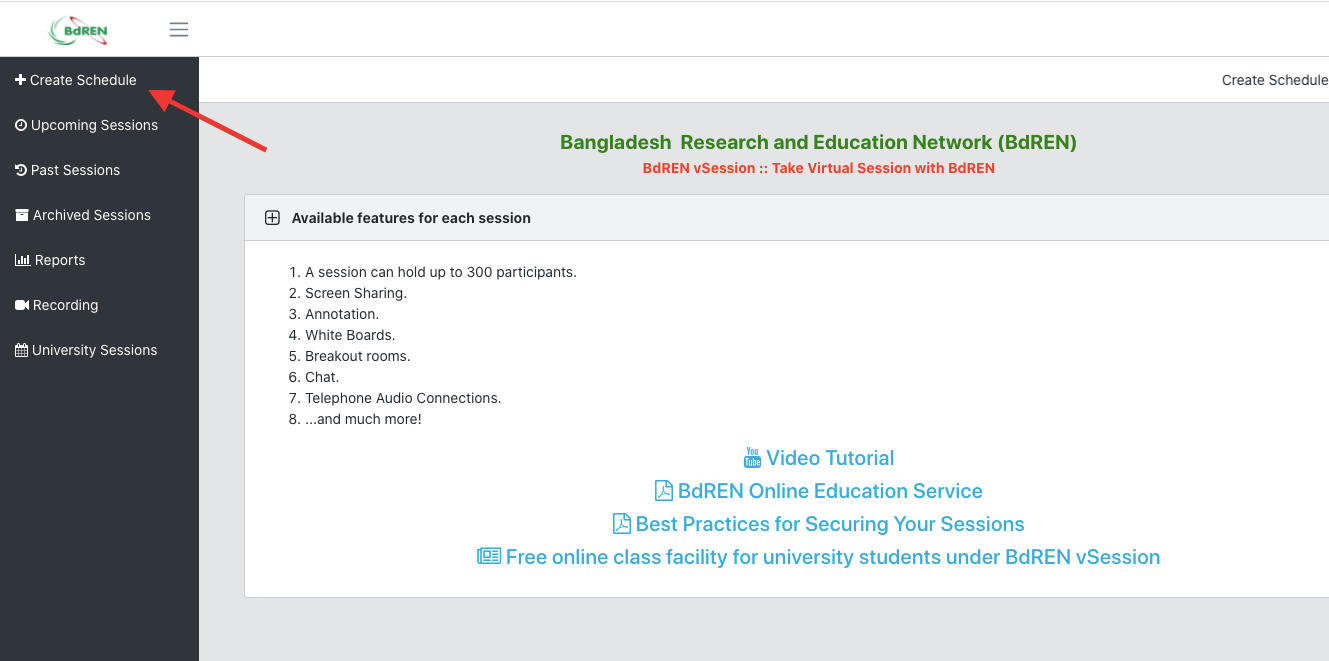
On the vSession portal, click “Create Schedules” in the top-left to schedule your class or meeting. A new screen will appear like
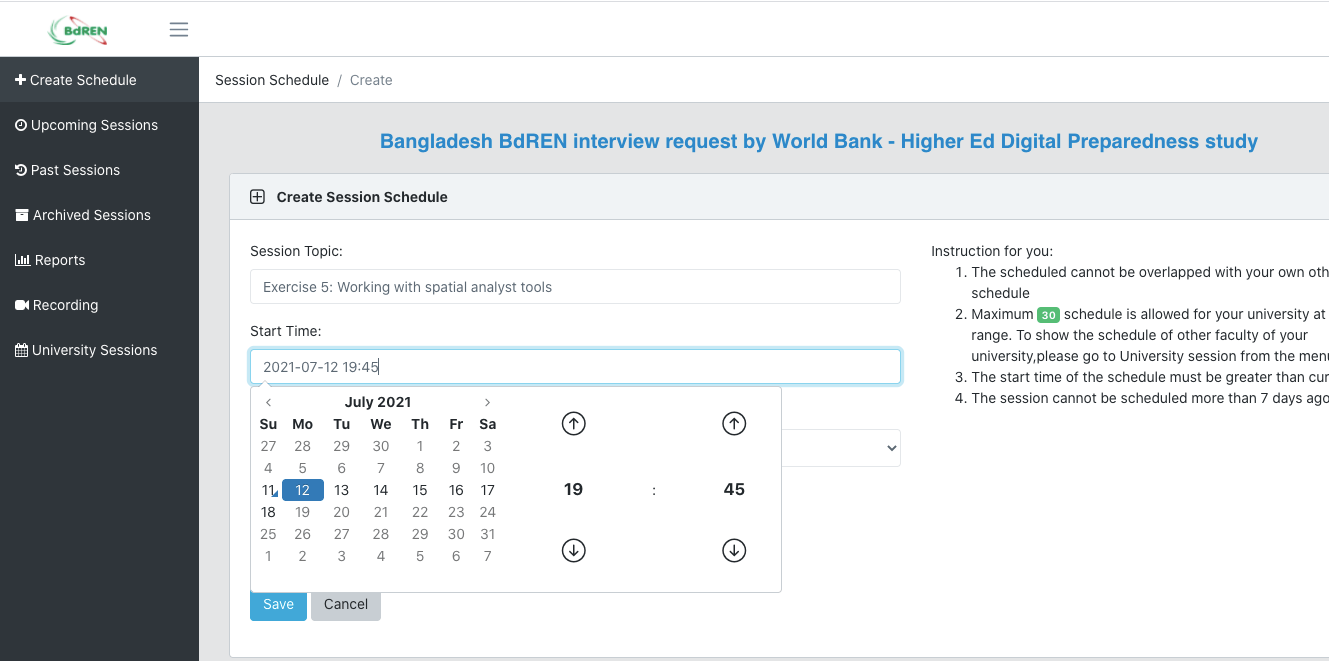
in which you can name your Session Topic/Course name, choose the date, time, and session duration, and once done please hit the “Save” button to confirm.
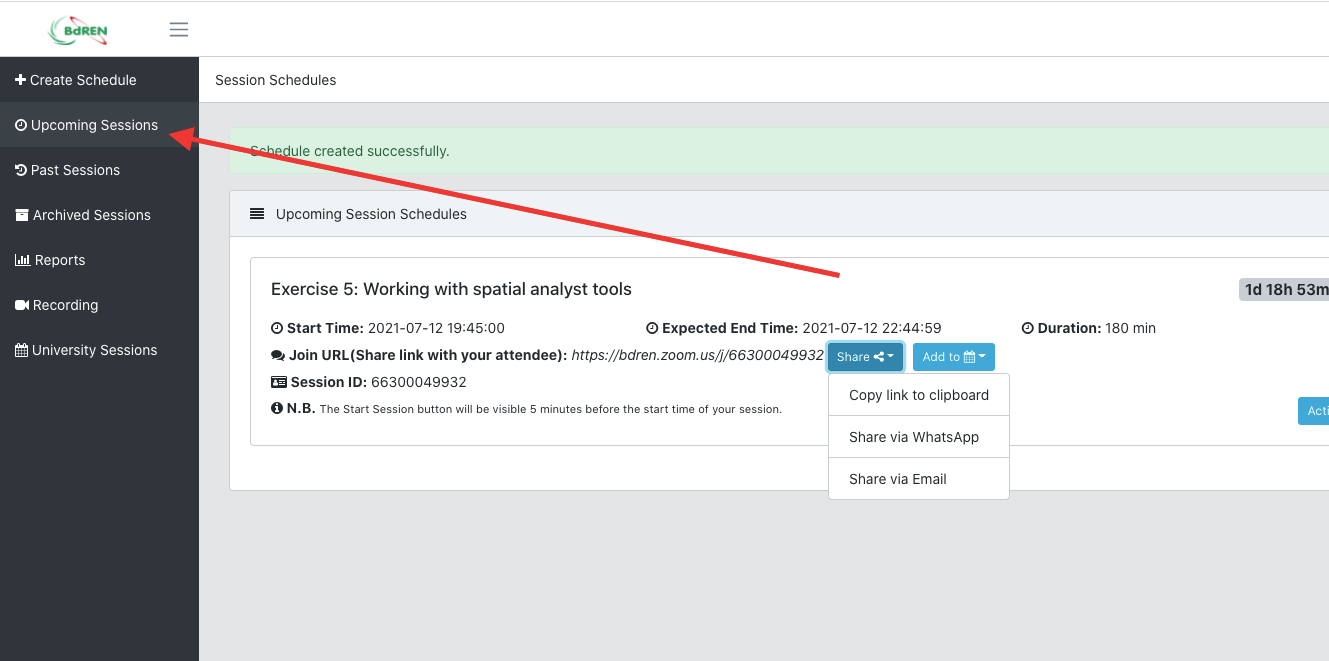
The class schedule is set Now.
Click on “My Upcoming Sessions” from the top-left menu, where you can find all of your scheduled upcoming sessions
Now question is, how do I invite participants to my Online virtual session?
Ans: The short answer is, you ought to do it manually. There are two ways to share the session URL. You can either do it using WhatsApp or by directly sending the URL to the participants’ email addresses.
Another question is, how do I start my BdREN vSession?
Ans: There is a “Start Session” column in your upcoming session schedules. According to your start time, a green “Start Session” button will automatically appear, with which you can start your class.
Refresh your page if it doesn’t appear automatically.
Important Note:
You need to repeat steps 1 and 2 for scheduling every new session. You can schedule multiple sessions. After the end time this Green “start session” button will disappear automatically, which can never be enabled again. If you see the following error at the beginning of the session, click “End Other Meeting” to start your meeting.
Under the “My Past Sessions” menu you shall find all of your previous
sessions.
Write your problem from the “BdREN Helpdesk” menu.
BdREN vSession is established in collaboration with Zoom Application. To get started using
BdREN vSession, please go through the following tutorials available at Zoom Support:
Frequently Asked Questions (FAQs):
Who can use vSession Account?
-BdREN Zoom vSession is available for all its member institutions.
How do I log into my vSession account?
–You can log on to your vSession account using your browser, please visit
https://vSession.bdren.net.bd
I have forgotten my “Sign In” password.
–Contact with BdREN Helpdesk to reset the password
What is the best hour to conduct vSession Class/Meeting?
–To avoid congestion and service interruption, we would request you to schedule
your session by avoiding this busy hour (10 AM – 12:30 PM)
How many people can connect to my class/meeting?
–Each session will allow for up to 300 participants.
Is there any time limitation in terms of class/meeting duration?
— No, there is no time limitation in terms of class/meeting duration.
Very frequently I get disconnected from my class/meeting.
— Check your WiFi router position from your location. Most of the time it
happens due to a weak WiFi signal. To get the best experience, It is suggested to use
a wired connection.
How many meetings can I run at a time with my vSession account?
–You are allowed to run one meeting at a time on your BdREN vSession account.
Is there a way to perform network, audio, and video diagnostics during a
meeting?
–Yes, please see the Meeting Statistics Zoom article for more information on how to
perform diagnostics during a meeting.
Can I stream my class to Facebook or YouTube?
— No, vSession Zoom does not support live streaming.
Can I record my class/meeting in the cloud?
–vSession account only supports local recording. Cloud recording is not supported.
Can I connect with anyone using vSession?
–Yes, you can invite anyone to join your sessions as a guest by providing them with
the session URL or session ID number. Users are not required to have a BdREN
vSession or Zoom account to join a meeting; only the meeting host is required to
have a vSession account.
Is vSession secured / will the sessions be encrypted?
–Yes, vSession meetings/classes are encrypted with Advanced Encryption Standard
(AES).
What system requirements does vSession need?
–View the Zoom System Requirements support article for details.
What Internet speed do I need for vSession meeting?
–For screen sharing only (no video thumbnail): 50–75kbps. For screen sharing
with video thumbnail: 50–150kbps.
Where do I get assistance with vSession?
— Please send an email to BdREN 24×7 Helpdesk describing your problem.
